Tampa Bay Buccaneers Mobile
4.6 2.09K Reviews
Analysis By AppCompare
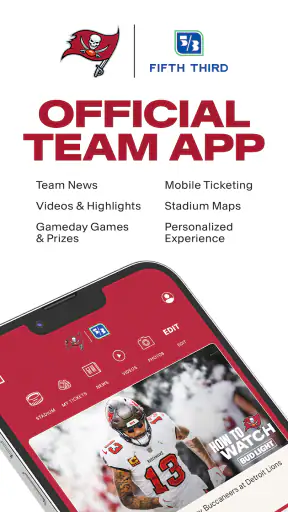
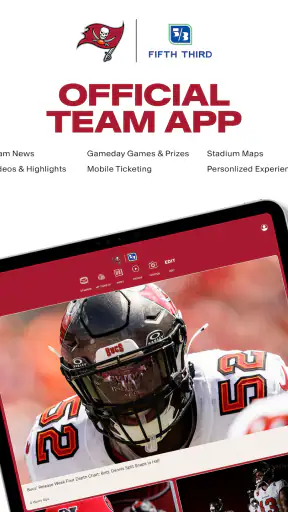
If you follow the Tampa Bay Buccaneers closely, Tampa Bay Buccaneers Mobile is the kind of sports app I would keep installed for team-specific updates rather than use as my only source for everything NFL-related. It is the official mobile app of the Tampa Bay Buccaneers, developed by YinzCam, Inc., and its main appeal is simple: it puts the club’s own mobile experience in one place instead of making me search through general sports apps for every team update.
That focus matters. A broad sports application is usually better when I want scores from several leagues, fantasy tools, or a large amount of national coverage. This app makes more sense when my attention is already on Tampa Bay and I want a direct team connection on my phone. I found the experience most useful in short visits: checking what is happening around the team, opening the app on game day, and returning when I want Buccaneers-specific information without sorting through unrelated clubs.
What the app offers Buccaneers fans
Tampa Bay Buccaneers Mobile belongs in the sports category, but it is more specialized than a general score tracker. The official-team identity is its clearest reason to exist. Instead of presenting the NFL as a large database first, it puts the Buccaneers at the center of the experience. That makes the app feel more like a digital team companion than a neutral sports utility.
I also appreciate that the app is free to download. That makes trying it a low-risk decision for a supporter who wants a team-focused mobile option. There is no purchase price to weigh against the basic experience, so the practical question is not whether it is worth buying. The better question is whether its focused coverage adds enough convenience beyond the sports apps already on your phone.
The age rating is Everyone, which fits the straightforward role of a professional sports companion. A parent, casual supporter, or long-time fan can approach it without the app feeling designed only for a narrow technical audience. The current version is 3.7.9, while the app has been available since Aug 17, 2011. That long presence suggests an established team-app concept rather than a temporary experiment, although an older release history also means I would pay attention to how smoothly the latest version behaves on my particular device.
The app has an average rating of 4.6 from around 7.3 thousand ratings, with around 2.1 thousand written reviews. It has also passed 100 thousand installs. Those figures do not replace personal testing, but they do indicate that the app has attracted a meaningful audience and that many users find the team-specific approach worthwhile.
A better role on game day than during every part of the week
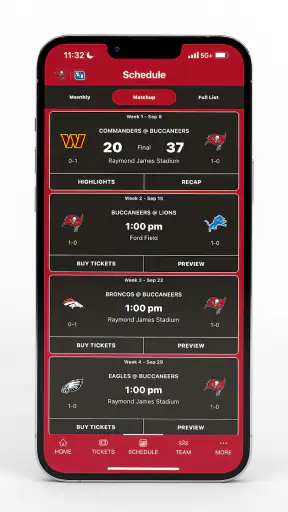
For me, the strongest use case is a game-day routine. Imagine checking the Buccaneers schedule before leaving work, opening the app again while waiting for friends to arrive, and then using it as a quick reference when the game begins. That is a more realistic pattern than expecting the app to replace every sports service I use. Its value comes from reducing the distance between me and one team, not from trying to become my complete sports universe.
That distinction helps set expectations. If I mainly follow Tampa Bay, the focused layout can save time and make the app feel relevant each time I open it. If I follow many teams at once, the same focus may feel restrictive. A general NFL app can be more efficient for comparing several games, scanning league-wide results, or moving quickly between teams.
One useful habit is to treat the app as a first stop for Buccaneers context and a second source for broader comparisons. I can check the team’s own mobile experience first, then move to a wider sports service when I need league-wide perspective. That two-app workflow is less elegant than having everything in one place, but it avoids forcing a team app to do a general sports app’s job.
Where the free price creates real value
Because the app is free, its value is mostly about convenience rather than financial return. I am not buying a premium product and then measuring whether it justifies a subscription. I am deciding whether a no-cost official app deserves storage space, notification attention, and a place in my game-day routine.
For a committed Buccaneers supporter, the answer is easier. Even a small amount of useful team-focused access can justify keeping it available, especially if I prefer official team communication to a crowded stream of national sports headlines. The free entry point also makes it practical for occasional fans: I can install it around the season, see whether the experience suits me, and remove it if I do not use it.
There is an important trade-off in free access, though. “Free” does not automatically mean “best value” if I already have a favorite sports app that gives me the same information more efficiently. The app earns its place when its team identity, presentation, and direct focus are useful to me. If those qualities do not change how I follow Tampa Bay, the absence of a purchase price will not make it essential.
I would also avoid assuming that a free app should provide every possible fan service without friction. Official team apps often work best as focused companions, while broader platforms may be stronger for customization, cross-team tracking, or deeper comparisons. The sensible approach is to judge this one by the specific convenience it adds, not by a wish list designed for a completely different type of sports product.
Small workflow choices that make it more useful
My first tip is to open the app before I actually need it. On a busy game day, checking the team experience earlier gives me time to learn where the information I care about is placed. That is more comfortable than installing it during a kickoff window and expecting an unfamiliar interface to become instantly useful.
My second tip is to decide what job the app has on my phone. If I want a Buccaneers-only home base, I should put it where I can reach it quickly and use it for team-centered visits. If I only want universal score alerts, a general sports app may be a better home-screen choice. Defining that role prevents duplicated notifications and makes the free app feel intentional rather than redundant.
A third practical insight is to compare the app with my existing routine after several game-day visits, not after one launch. A team app can feel appealing because it is official, yet still fail to save time if I keep switching elsewhere for the information I actually need. I would watch for whether it helps me answer my common questions quickly: what is happening with Tampa Bay, when should I check in, and does the team-focused presentation make following the club easier?
Another useful trade-off concerns attention. A dedicated team app can make it easier to stay connected to the Buccaneers, but that same specialization can encourage me to open it more often than necessary if I only want one quick score. I prefer using it deliberately around team-related moments rather than allowing every sports application on my phone to compete for my attention.
What may frustrate some users
The biggest limitation is not the price; it is the narrow scope. This is a Tampa Bay Buccaneers app, so it is naturally less suitable for someone who wants one neutral place for several NFL teams, multiple sports, fantasy management, or broad statistical comparison. A national sports platform will usually be the better primary tool for that kind of user.
I also would not choose it as my only sports app if I regularly jump between teams. The official focus that makes it pleasant for Buccaneers fans can become extra navigation for everyone else. A supporter who watches a wide range of games may prefer a service built around league-wide scanning, then use this app only when Tampa Bay is the priority.
There can also be a difference between wanting information and wanting atmosphere. If I only need a bare score, a lightweight scoreboard may get me there faster. If I want a more team-centered mobile experience, this app has a stronger reason to exist. The choice depends on whether I value the Buccaneers identity around the information or only the information itself.
Device compatibility deserves a quick check before installation. The minimum operating system is 10, so users on older software should not assume the app will be available for their phone. For supported devices, I would still keep the operating system current where possible and install the latest app release, since sports apps are especially dependent on timely updates during active seasons.
Another point I would keep in mind is that a current version number does not guarantee that every user will have the same experience. Phones differ in screen size, operating-system behavior, and background activity settings. If timely updates matter to me, I would review the app’s notification behavior on my own device instead of assuming that an alert will always arrive exactly when I want it.
Who gets the most from the app
This app is a strong match for a dedicated Buccaneers fan who wants the team to have its own place on the phone. It is also sensible for a supporter who does not need advanced league-wide tools and would rather open a focused official app than filter a general sports feed. Because it is free, casual fans can test that fit without committing money.
It may also suit someone who follows Tampa Bay seasonally. I do not need to be a person who opens a sports app every day. I can use this one during the weeks when the team is most relevant, keep it available for game-day checks, and decide later whether it deserves permanent space. That flexibility is one of the clearest benefits of free access.
I would be more cautious if I already rely on a comprehensive NFL service and rarely care about team-specific presentation. In that case, installing another app may create duplicate alerts and another place to check. The same applies to fans who need detailed tools across many teams; a broader alternative is likely to deliver more value in one workflow.
For families or less technical users, the Everyone rating and direct team identity make the app approachable. Still, I would explain its purpose clearly: it is for following Tampa Bay, not a complete replacement for every sports feature. That simple explanation can prevent disappointment and helps each person decide whether the focused design matches their habits.
My verdict on free value
I recommend Tampa Bay Buccaneers Mobile to fans who want a dedicated, no-cost way to keep the Buccaneers close at hand. Its best quality is not that it tries to cover everything. It is that it gives one team priority and can fit naturally into a game-day routine. The official connection, long availability, and strong user response make it an easy app to try for supporters who have not used a team-specific mobile companion before.
My honest recommendation is to install it if Tampa Bay is your main team, but keep a broader sports app for league-wide work. That combination reflects the app’s real value: focused convenience rather than universal coverage. I would not pay for it because the download is free, and I would not judge it by premium-service expectations. I would keep it only if the team-centered experience makes my regular checks faster or more enjoyable.
In the end, Tampa Bay Buccaneers Mobile is an easy yes for committed Buccaneers supporters, a reasonable trial for occasional fans, and a skip for people who want a single all-sports dashboard. Its free price removes the financial barrier, but your time and attention still matter. If the official Tampa Bay focus fits the way you follow football, the app earns a place on your phone; if you mainly need broad scores and comparisons, a general sports alternative will serve you better.
FAQ
What is the Tampa Bay Buccaneers Mobile app used for?
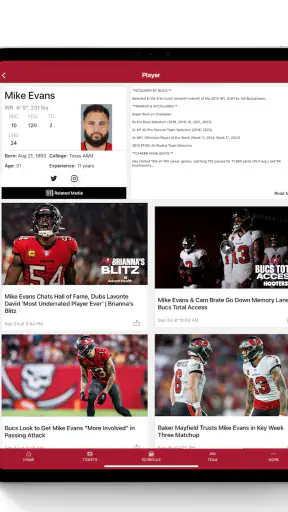
Tampa Bay Buccaneers Mobile is the official app for following the Buccaneers on Android and iOS. It brings together team news, game schedules, scores, standings, articles, videos, roster information, and social updates in one place. It is especially useful on game day, when fans want quick access to live updates, statistics, and official team announcements.
Does the app provide live scores and game updates?
Yes, the app is designed to keep fans informed during Buccaneers games with live scores, play-by-play information, game statistics, schedules, and other real-time updates. The exact features available may depend on the season, league services, your location, and whether notifications are enabled. It should complement, rather than replace, your television or official broadcast coverage.
Can I buy tickets or manage tickets through Tampa Bay Buccaneers Mobile?
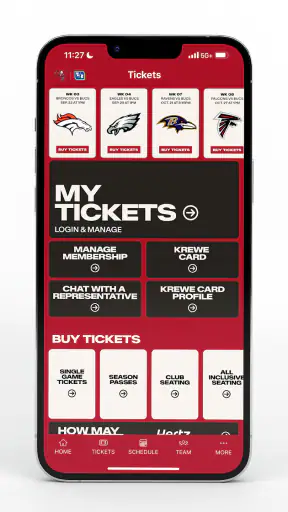
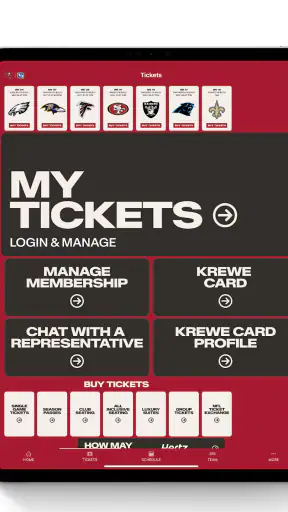
The app may provide access to official ticket information, ticket purchasing options, mobile ticket management, stadium details, and links to related Buccaneers services. Availability can vary according to your account, event, ticket type, and current team policies. For security, users should sign in only through the official app and verify that ticket links lead to authorized Buccaneers or NFL services.
Does Tampa Bay Buccaneers Mobile support push notifications?
Yes, push notifications are generally available for important team updates, breaking news, game reminders, scores, roster changes, and other selected alerts. During setup, you can usually choose which notifications you want to receive. If alerts do not appear, check the app’s notification settings, your phone’s system permissions, battery-saving restrictions, and your internet connection before reinstalling the application.
Is Tampa Bay Buccaneers Mobile free to download and use?
The Tampa Bay Buccaneers Mobile app is typically free to download, and many core features—such as news, schedules, scores, videos, and team information—can be used without paying an app subscription. However, certain activities may involve separate costs, including tickets, merchandise, premium content, data charges from your mobile provider, or purchases made through linked official services.
Pros
- Official source for Buccaneers news
- scores
- schedules
- and team updates.
- Mobile tickets and stadium information make game-day planning more convenient.
- Push notifications can keep fans updated on breaking news and live results.
- Includes team videos
- interviews
- and other content for dedicated supporters.
- Clean team-focused design makes key Bucs information easy to find.
Cons
- Most useful features are mainly relevant to Tampa Bay Buccaneers fans.
- Some content may require a reliable internet connection to load properly.
- Notifications can become frequent during games and major team news.
- Ticket and account features may depend on supported events or locations.
- The app offers limited value for fans seeking broader NFL coverage.